
Last updated on
Sep 28, 2026

Redmond O:PH0001 2005-2026 free printable template
pdfFiller is not affiliated with any government organization

Fill out
Complete the form online in a simple drag-and-drop editor.

eSign
Add your legally binding signature or send the form for signing.

Share
Share the form via a link, letting anyone fill it out from any device.

Export
Download, print, email, or move the form to your cloud storage.
Why pdfFiller is the best tool for your documents and forms


End-to-end document management
From editing and signing to collaboration and tracking, pdfFiller has everything you need to get your documents done quickly and efficiently.
Accessible from anywhere
pdfFiller is fully cloud-based. This means you can edit, sign, and share documents from anywhere using your computer, smartphone, or tablet.
Secure and compliant
pdfFiller lets you securely manage documents following global laws like ESIGN, CCPA, and GDPR. It's also HIPAA and SOC 2 compliant.
What is Redmond O:PH0001
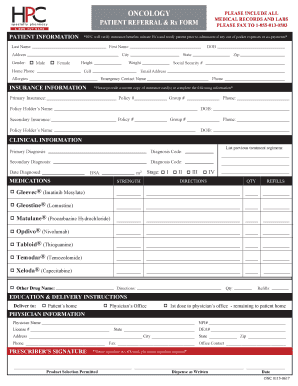
The Chemotherapy Order Form is a medical consent document used by healthcare professionals to authorize chemotherapy treatments for patients.
pdfFiller scores top ratings on review platforms




Who needs Redmond O:PH0001?
Explore how professionals across industries use pdfFiller.

Redmond O:PH0001 is needed by:
-
Nurses involved in patient care
-
Medical Doctors authorizing treatments
-
Pharmacists preparing chemotherapy
-
Healthcare administrators overseeing forms
-
Oncologists managing patient therapies
Comprehensive Guide to Redmond O:PH0001
What is the Chemotherapy Order Form?
The Chemotherapy Order Form is a critical document used by healthcare professionals to authorize chemotherapy treatments for patients. This medical consent form serves as a comprehensive record that includes essential patient data, lab results, and treatment specifics. By documenting these details, healthcare providers ensure that all necessary information is available for effective treatment planning. Typically, this form is utilized by nurses and physicians, emphasizing the collaborative nature of patient care.
Purpose and Benefits of the Chemotherapy Order Form
This healthcare authorization form plays a vital role in enhancing communication between healthcare providers. By standardizing the documentation process, it significantly reduces the risk of errors, leading to improved patient safety. One of the considerable advantages of using a digital platform like pdfFiller is the ease of access and usability, which enables healthcare professionals to fill out forms accurately and efficiently. Ultimately, the chemotherapy treatment form ensures that patient data is not only efficiently gathered but also effectively communicated among team members.
Key Features of the Chemotherapy Order Form
The Chemotherapy Order Form includes several fillable sections designed to gather comprehensive clinical information. Key components of the form are:
-
Patient data, which captures vital personal and medical information
-
Lab results, critical for treatment decisions
-
Medication details, specifying treatments
-
Signature fields for both the nurse and the medical doctor
Additional fields pertain to previous treatments and allergies, which are crucial in planning concurrent therapies that may affect the overall treatment approach.
Who Needs the Chemotherapy Order Form?
The primary users of the Chemotherapy Order Form include nurses and medical doctors who are responsible for signing off on treatment plans. Patients seeking chemotherapy are typically the ones for whom this form is required, highlighting its importance in the process. Effective collaborations among healthcare teams, including oncologists and nursing staff, are essential to ensure that this form is filled out correctly and used effectively throughout the treatment journey.
How to Fill Out the Chemotherapy Order Form Online (Step-by-Step)
Filling out the Chemotherapy Order Form digitally is straightforward. Follow these step-by-step instructions:
-
Access the Chemotherapy Order Form through the pdfFiller platform.
-
Begin by entering the patient data in the designated section.
-
Input lab results accurately, ensuring all relevant values are included.
-
Fill in medication details, making sure to specify dosages and administration routes.
-
Ensure that all required fields are completed before submission.
For a seamless experience, use tips to double-check all information for accuracy and completeness, leveraging the user-friendly features of pdfFiller.
Common Errors and How to Avoid Them
While filling out the Chemotherapy Order Form, users may encounter several common pitfalls. Frequent mistakes to be aware of include:
-
Missing signatures from either the nurse or the doctor
-
Incomplete or incorrectly filled fields
To prevent these issues, it is advisable to validate the information entered and review the completed document with healthcare professionals before finalizing and submitting.
How to Sign the Chemotherapy Order Form
Signing the Chemotherapy Order Form can be accomplished through various methods, each meeting specific requirements. It's important to understand the differences between digital signatures and traditional wet signatures:
-
Digital signatures must adhere to security regulations and can be completed using pdfFiller
-
Wet signatures may require the physical signing of the document
Users can be assured of the security measures implemented by pdfFiller, protecting their information while signing electronically.
Submission Methods and Tracking Your Submission
After completing the Chemotherapy Order Form, there are several methods for submission. These include:
-
Electronic submission via email or secure portals
-
Faxing the document to the appropriate offices
-
Sending physical copies through mail
Once submitted, tracking the status of the form can be done through follow-up communications with healthcare providers, ensuring that the authorization process is smoothly managed.
Privacy and Data Protection with the Chemotherapy Order Form
Handling sensitive information securely is paramount when using the Chemotherapy Order Form. pdfFiller employs comprehensive security measures, including 256-bit encryption, to protect personal data. Compliance with HIPAA and GDPR regulations ensures the confidentiality of patient information is maintained throughout the documentation process. Best practices for managing this form involve secure storage and careful retrieval of completed documents, providing users with peace of mind regarding privacy.
Effortless Documentation with pdfFiller
Using pdfFiller for your Chemotherapy Order Form facilitates a seamless documentation experience. The platform offers a user-friendly interface, enabling users to create, manage, and easily share forms. Additional features, such as cloud storage and document sharing capabilities, streamline the entire process, making pdfFiller a reliable solution for effective healthcare documentation.
How to fill out the Redmond O:PH0001
-
1.Access the Chemotherapy Order Form by logging into your pdfFiller account and searching for the form title in the template section.
-
2.Open the form, and familiarize yourself with the layout and various fillable fields provided.
-
3.Before starting to fill the form, gather all needed patient information, including previous treatments, allergies, medications, and lab results.
-
4.Begin completing the required fields starting with the 'Date' and 'Time' sections, ensuring accuracy in all entries.
-
5.Navigate to the 'Patient Data' field and input all relevant patient details, such as name, age, and medical history.
-
6.Next, proceed to the 'Lab Results' section and enter any pertinent findings that impact treatment decisions.
-
7.When completing the medication details, make sure to specify drug names, dosages, and any relevant administration instructions.
-
8.After filling all fields, carefully review the entire form for any errors or missing information.
-
9.Ensure that both the nurse and MD signatures are acquired in the indicated fields to validate the authorization.
-
10.Once the review is complete, save your changes, and choose to either download a copy or submit the form electronically through pdfFiller.

Who is eligible to fill out the Chemotherapy Order Form?
The Chemotherapy Order Form is primarily intended for use by healthcare professionals such as nurses and medical doctors involved in patient chemotherapy treatment.
Are there specific deadlines for submitting this form?
While specific deadlines can vary based on treatment schedules, it is crucial to complete and submit the Chemotherapy Order Form promptly to avoid delays in patient care.
How can I submit the completed form?
You can submit the completed Chemotherapy Order Form electronically through pdfFiller's submission options, or you may download and hand-deliver it to the appropriate healthcare facility.
What supporting documents are required when using this form?
Typically, supporting documents may include patient medical records, lab results, and any prior treatment authorization. Ensure that all necessary information is available when completing the form.
What are common mistakes to avoid when filling out the form?
Common mistakes include leaving fields blank, inaccurately entering patient data, or failing to obtain required signatures. Always double-check your entries before submission.
What is the typical processing time for this form?
Processing times may vary; however, healthcare facilities typically address chemotherapy orders swiftly due to the urgent nature of treatment. Always check with your facility for specific timeframes.
What should I do if I encounter issues accessing the form online?
If you face difficulties, try refreshing your browser or logging out and back into your pdfFiller account. If issues persist, contact pdfFiller support for assistance.
Related Content
Related Forms





Related Catalogs
Get the latest insights from our blog


If you believe that this page should be taken down, please follow our DMCA take down process
here
.
This form may include fields for payment information. Data entered in these fields is not covered by PCI DSS compliance.